by Viviana Tipiani Yarlequé and Anja Rütten
The latest Computer-Aided Interpreting tool that has made its way to the CAI market is Sight-Terp. It has been around since November 2025, which was exactly the time when we had our three-day intensive CAI testing weekend in Cologne. Whilst we could only accomodate a short test cycle for Sight-Terp back then, we have in the meantime been able to take a closer look.
Sight-Terp is a browser-based computer-assisted interpreting (CAI) platform, so no installation is required and it works across platforms. Its tagline “your digital boothmate” does not quite reflect Sight-Terps bandwith: It not just helps you in the booth, but supports your interpreting cycle from training to live performance. This makes it particularly suitable for interpreting students.
So Sight-Terp bundles three distinct tools under one roof:
Assist (live-prompting support for simultaneous interpreting)
Evaluate (AI-powered assessment of your interpreting performance), and
Practice (AI-generated practice speeches)
Sight-Terp Assist
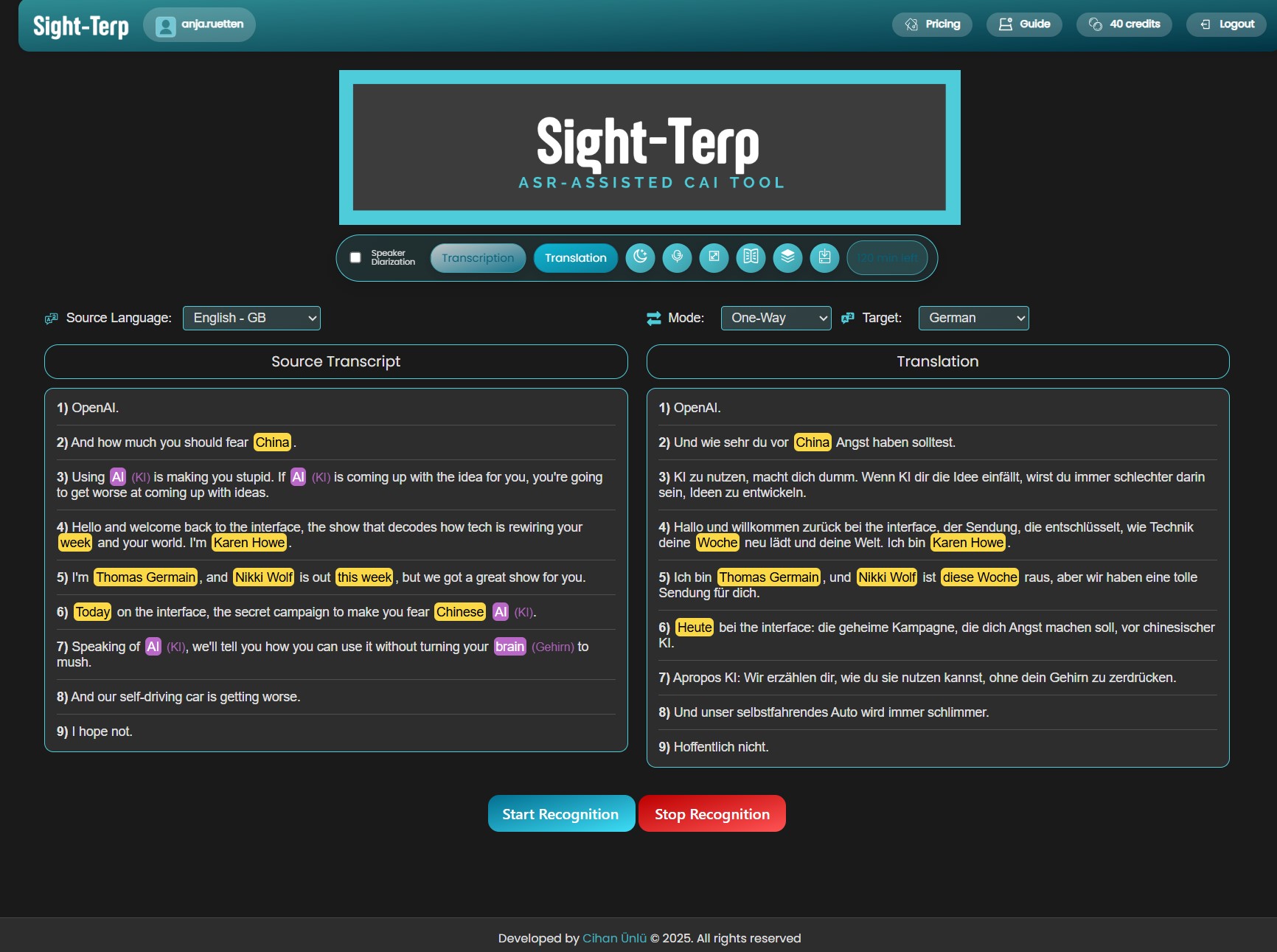
Sight-Terp Assist is the live boothmate module. It offers real-time automatic speech recognition (ASR), neural machine translation, speaker diarisation (i.e. the ability to distinguish between multiple speakers), and entity highlighting – a feature that makes numbers, names, and key terms stand out visually in the running transcript. Assist also supports custom glossary import, so that your pre-prepared terminology can be flagged in the live transcript, and dynamic translation for individual terms.

Highlighting numbers and named entities
Numbers and named entities (names, places, organisations) are visually flagged in the running transcript. This is one of the most sought-after features for interpreters.
Speaker diarisation
The speaker diarisation feature – distinguishing between different speakers in the transcript – creates a better visual layout and makes it much easier to follow who said what, especially in panel discussions or Q&A sessions. A great addition.
Two-way language mode
Sight-Terp supports over 50 languages. It works in a two-way language mode where you don’t need to press a button to change the source language, as it recognises both working languages automatically. Unfortunately, there is no automatic language recognition, so working with more than two languages is a bit more inconvenient than with just one language pair.
Consecutive interpreting at its heart: SightConsec
The tool was originally designed with consecutive interpreting in mind – this is also where the academic research behind it is rooted (see below). The SightConsec mode is straightforward and easy to navigate, and the automatically enumerated segmentation of the transcript is one of those details that makes a real difference in practice: it helps you identify sections immediately and navigate the text quickly while interpreting. Good punctuation in the ASR output contributes to this too – and Sight-Terp does this reasonably well, which not all tools manage.
Context configuration
This is one of the features I find most thoughtful. Rather than only allowing you to add a glossary, Sight-Terp lets you configure “context” – meaning you can add not just terms but also general background information and reference texts. This gives the ASR and translation engine something to work with beyond individual word pairs, which can improve output quality for specialised topics in a meaningful way.
Transcript export
The transcript export function can be very helpful for your follow-up terminology work, or even to prepare for follow-up assignments by the same client or on the same topic.
Sight-Terp Evaluate
Sight-Terp Evaluate takes a different angle: you upload a recording of your own interpretation and receive AI-powered feedback with a detailed analysis and suggestions for improvement. You just upload your source and target audio (up to 25 MB), indicate which languages they are in and the report style you want (medium length, detailed, more detailed). When we tested it, a 17 MB/30 minute audio file was rejected, but a 6 MB/10 minute one worked fine.
Sight-Terp Evaluate conveniently provides a transcript of the source and target text as well as a “reference text” in the target language. When you try the evaluation function yourself, make sure you do not take the scores too personally:

The evaluation report in its most detailed version is 7 pages long and very redundant, so the shortest version will most probably suffice. Several “mistakes” are being identified and then mentioned over and over again in each section. The report is divided as follows:
Part 1 (delivered in English, the source language): Accuracy, Fidelity, and Completeness
Meaning and Intent – Deviations and Omissions – Overall Accuracy
Part 2 (delivered in German, the target language): Cohesion, Terminolgy, Disfluencies
Overall, the evaluation clearly follows a rather text-based approach. The mistakes the system “finds” are very often not mistakes. The reasons for that in our example are mostly lack of context/background/terminology knowledge. Here are some examples:
“also” being interpreted as a filling word while it is actually a consecutive conjunction. Filling words in general being extremly criticised, as would be appropriate for a written text, but not in an oral delivery, where they can also make a speech more fluent.
The English term “DG Employment” (for Directorate General) translates into “GD Beschäftigung” (for Generaldirektion), which is being criticised by the system for inverting the order of the letters DG. Other EU-specific terms (“AdR” for “Committee of the Regions”) are not recognised.
Terms like SEDEC or names of individuals are seen as mistakes obviously because they are transcribed differently in English and German.
English terms like “skills intelligence” are left untranslated in German, but explained once to introduce a term, which is criticised by the system and not recognised as an interpreting strategy.
When the speaker said “I think” or “I am not sure”, the interpreter was criticised for rendering this in their interpretation.
All these misinterpretations are inherent to interpreting, where the specific features of spoken language (prosody, pronunciation, fluency), context and background knowledge, jargon and terminology make it particularly difficult to automate assessment. This being said, there is still added value in receiving quick feedback and probably also some useful pointers. The system did indeed identify one technical term that could have been rendered more precisely.
Given that this evaluation function is surely meant to support students rather than professionals in the first place, there is certainly some merit in using it with texts (like those generated automatically) that do not contain references to specific situations, jargon or client-specific terminology.
Sight-Terp Practice
The Practice module generates custom practice speeches on any topic and difficulty level chosen by the user. You enter your topic of choice (or choose from a range of suggestions), language, degree of dificulty (from very easy to professional/technical), and interpreting mode. You will then get a draft speech which you can edit. After that, the final speech is generated and terminology extracted. As a final step, you select a voice and the audio speech is generated. Unfortunately, it isn’t possible to tell which accents the 30 difference voices have. The generated audio was about 4 minutes, and was somewhat too fast to interpet when being replayed in the browser – and the slightly monotonous prosody of the artificial speech is not very helpful either. But the audio file can also be downloaded, which allows you to slow it down when playing it in an audio player. It is also a bit on the short sight for simultaneous practice. However, all in all this is a convenient source of practice speeches, although it might be an alternative to have them read out by a human to give it a more lively and realistic touch.

Technicalities
One of the things we appreciate most about Sight-Terp is how user-friendly it is. Log in to the website, select your audio input, and you’re ready to go – no installation, no configuration wizard. The “How to use” section is clearly written and accessible even to colleagues who are not particularly tech-savvy. The Quick Start guides are genuinely useful, and the tips displayed at the bottom of the interface page are a nice touch that we don’t recall seeing in other tools.
Dark mode
A small but welcome detail: the interface works in dark mode, which matters for anyone doing long sessions or working in low-light booth environments.
One device, one window
Sight-Terp works easily with Zoom and other platforms from a single device. No second device required (unless you prefer a two-computer setup).
Pricing
Subscription (from 5.90 USD/month) or credit packs (e.g. 2.50 USD for 20 assist credits, 30 evaluate credits and 30 practice credits); free test credits available
Research background
Sight-Terp was developed after some research worth noting. The tool was developed by Cihan Ünlü, and a peer-reviewed experimental study on its use in consecutive interpreting was published in late 2024 in Tradumàtica:
Ünlü, C., & Doğan, A. (2024). Enhancing consecutive interpreting with ASR: Sight-Terp as a computer-assisted interpreting tool. Tradumàtica. Tecnologies de la Traducció, 22, 401–425.
The study found that ASR integration improved the accuracy of participants’ renditions in consecutive interpreting tasks, though it also led to an increase in disfluencies and longer task durations compared to tasks completed without Sight-Terp. These findings are consistent with what we know about the cognitive demands of managing a live transcript while interpreting. The tool helps with content, but adds a new layer of divided attention that requires practice to manage well.
The tool also grew out of another MA thesis at Hacettepe University, Ankara, accessible via the Turkish national thesis database.
Conclusion
All in all, we think that Sight-Terp is a valuable and refreshing addition to the CAI landscape. Fast and very user-friendy, plus it comes with some nice AI-based student-centred features.
Anja Rütten has specialised in tech, information and terminology management since the mid-1990s. She holds a professorship in interpreting studies and Computer-Aided Interpreting at the Cologne University of Applied Sciences. Disclaimer: Views or opinions expressed are solely my own and do not express the views or opinions of my employer.
Contents
Leave a Reply