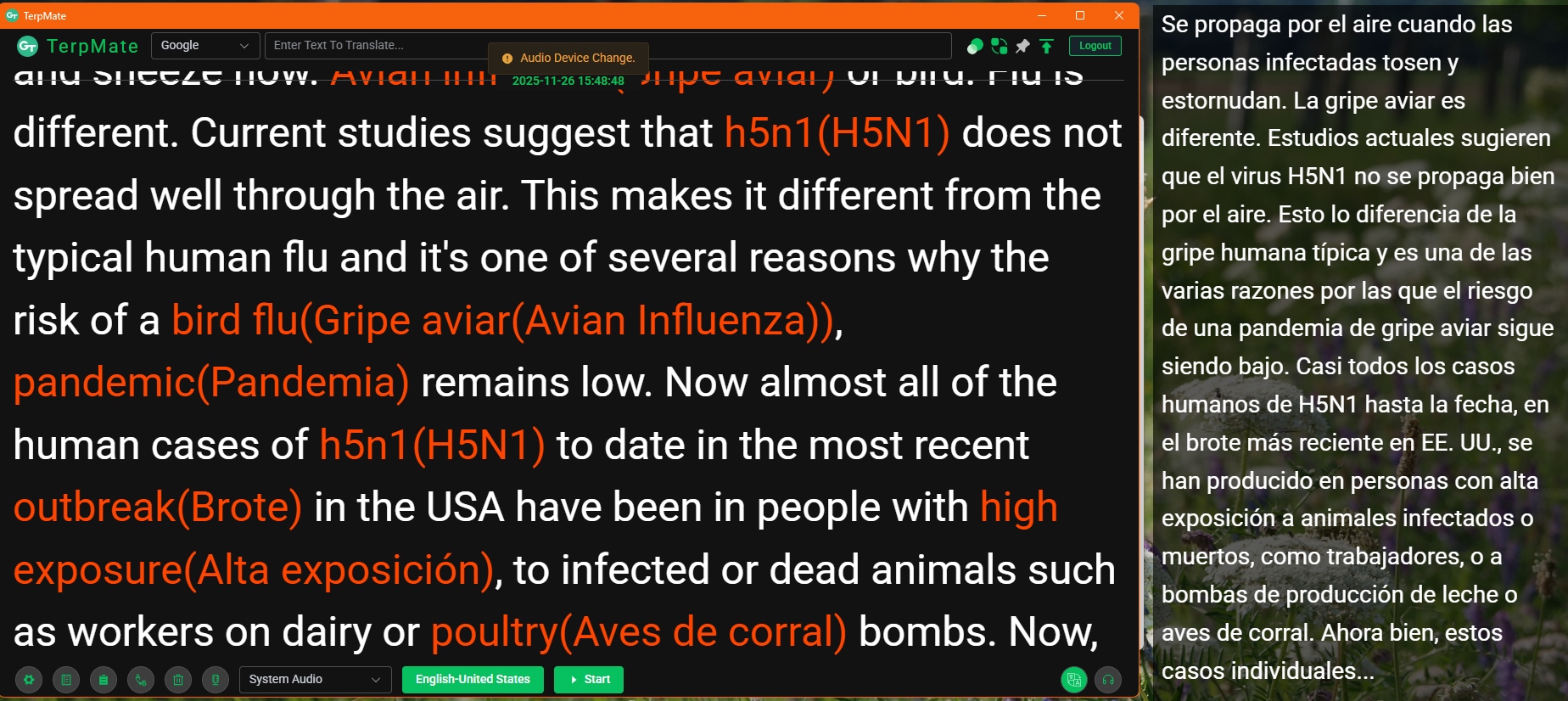
TerpMate was published in April this year (2025). It was the latest addition to the CAI tool landscape indeed, just until SightTerp was released last month (review coming soon). Now, TerpMate is part of the Greenterp ecosystem created by Green Terp Technologies Pte Ltd and their CEO Bernhard Song, who himself is a professional conference interpreter. Originally an RSI-friendly video conference platform, it was awarded a prize by CIUTI for its conference interpreter training platform in 2021.
Nele Kirstein and I have tested the tool together with the AI4terp.org team and AIIC’s AI workstream last week. Here comes our short report:
TerpMate provides a complete live transcript which highlights terms plus equivalents from the user’s preloaded glossary. It also allows editing of glossaries or retrieval of translations for terms in the running transcript with one click. These functionalities are very similar to Cymo Note, both in terms of UI and UX. The quality of the ASR output is also comparable, particularly when using the Microsoft engine in both tools – the output is identical – even though Cymo runs only and TerpMate offline. In addition, TerpMate offers live translation and a bilingual document reader. Both of these additional functions open in separate windows which can be accommodated conveniently on your screen. In the bilingual document reader you can upload a manuscript file, read and edit a machine-generated (DeepL or Google) or your own translation with parallel scrolling.
The proprietary ASR engines TerpMate uses can be downloaded and installed locally (clients for Windows, Mac and Android) so that no internet connection is needed for on-site meetings.
Languages supported by TerpMate’s proprietary ASR model are German, English, Spanish, French, Hindi, Indonesian, Italian, Japanese, Korean, Polish, Portuguese, Thai, Turkish and Chinese.
What we like about TerpMate
- user-friendly, intuitive UI
- no internet connection required, it runs offline once you’ve downloaded your ASR engine
- easy glossary building (manual, Excel import, drag and drop) and manual term extraction
- you can store several glossaries and select the one you want to apply to your current transcript
- bilingual document scrolling
- ASR works well for “large” languages, like English (we have only tested few languages so far)
- highlights glossary terms in the running transcript
- force replace and live (AI) translation (single terms and full text)
- single device for RSI: select “system audio” as your audio input to run TerpMate on your main interpreting device (in our tests, we’ve had some issues with this on MacOS)
- privacy first: doesn’t store any data and can be used without internet connection
This is what the bilingual document reader looks like:

What to bear in mind
- working languages need to be selected in advance (two can be selected and assigned different AST engines, a third language can be set to “auto” mode so that the language being spoken is recognised automatically); change of source language needs to be set manually
- ASR quality varies by language
- you cannot just drag and drop your preparation documents into the interface and you have to add a complete folder to the bilingual reader (it is not possible to just select one file)
- transcripts cannot be exported
- no highlighting of numbers in the live transcript
- glossary terms are not always recognised
- the “one device only” function as well as the use of the Microsoft ASR machine can be a bit complicated when being set up for the first time
- Tip: Use the Microsoft engine for speech translation. The pre-selected Google engine is not very good at recognising sentences and inserting commas, full stops and question marks where they belong.
Provider: Green Terp Technologies Pte Ltd, Singapore
Website: https://www.gtmeeting.com/solutions/terpmate
Privacy & Data Protection: “zero exposure (military-grade)”, ASR model can be downloaded so that TerpMate can be used without internet connection
Cost: Free 3-month trial for any new user. Subscription plans (no usage limits) activate post-trial at Singapore $10/month.
Focus: running script+translation in separate window, parallel scrolling of speech manuscript and translation, downloadable ASR models enable operation without internet connection

——————
About the authors:
Nele Kirstein is a conference interpreter (M.A.), lecturer at TH Köln, board member of the VKD im BDÜ e.V. and researcher/collaborator on the EU-funded AI4Terps.org project.
Anja Rütten has specialised in tech, information and terminology management since the mid-1990s. She holds a professorship in interpreting studies and Computer-Aided Interpreting at the Cologne University of Applied Sciences.
Disclaimer:
Views or opinions expressed are solely my own and do not express the views or opinions of my employer.
Leave a Reply